
Delete your account
You can delete your Wingman AI account and data yourself, right inside the app. It takes less than a minute.
- Open the Profile tabTap Profile in the bottom bar of the app (the person icon on the right).
- Scroll to “Account & Privacy”It's the last section on the Profile screen, below “Help us improve”.
- Tap Delete account & dataIt's the red button at the bottom of the list, under Sign out.
- ConfirmConfirm when the app asks you. Your account is then deleted and you're signed out. This can't be undone.
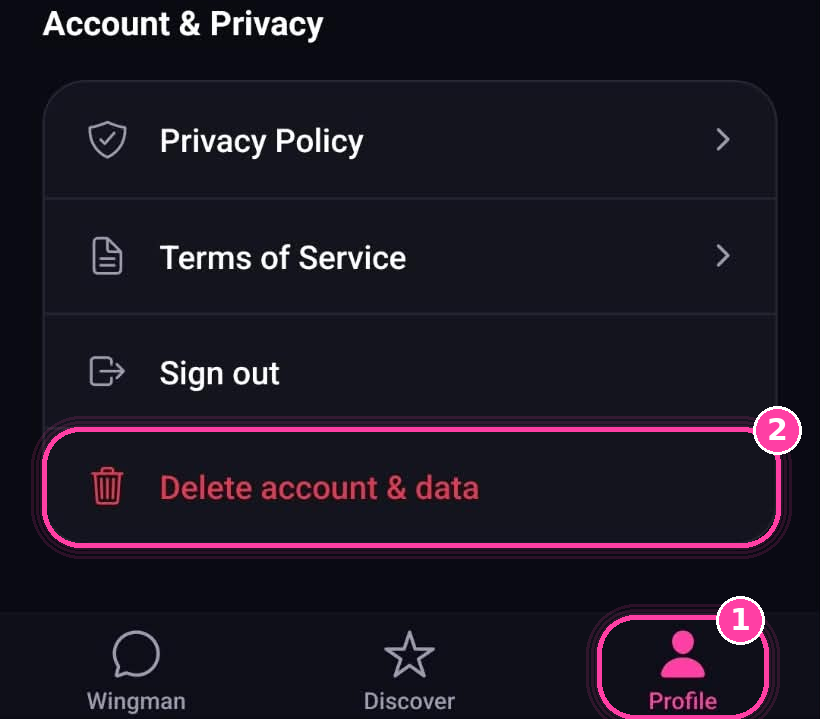
1 · Profile tab → 2 · Delete account & data
What happens when you delete
Erased
- Your sign-in account (name, email, photo)
- Profile preferences and setup answers
- Saved replies (favorites) and stats
- Usage and subscription records
- Feedback you sent
- Everything stored on your device
Kept, but no longer linked to you
- AI cost records and app activity events, with your account ID removed
- Encrypted backups may hold deleted data briefly before they expire
We don't save the text of your messages or your screenshots, so there's nothing to delete there. See the Privacy Policy for full details.
Deleting your account does not cancel your subscription
If you have Wingman Pro, cancel it separately in your App Store subscriptions (iPhone) or Google Play subscriptions (Android) at least 24 hours before the period ends. Deleting or uninstalling the app does not stop billing.
Can't open the app?
Email us from the address you signed up with and ask us to delete your account. We'll confirm once it's done.
Request deletion by email